
 ImageHub
 Free plan
My assets AI Generate
AI Image Generator Generate images from text descriptions. AI Image to Image Transform existing images with AI. AI Background Generator Create studio-style backgrounds. AI Anime Generator Turn photos into anime styles. AI Headshot Generator Create polished profile portraits. AI Emoji Maker Make custom emoji assets. AI Product Photography Create product images for commerce. AI Art Generator Turn photos into AI artwork.
AI Enhance
AI Image Enhancer Improve clarity and detail. AI Image Extender Expand images beyond their frame. AI Image Upscaler Upscale images to higher resolution. AI Unblur Images Sharpen soft or blurred photos. AI Denoise Reduce noise and grain. AI Photo Restoration Restore old or damaged photos. AI Shadow Generator Add realistic shadows to product photos.
AI Remove
AI Edit
AI Image to Image Generator
Upload an image, describe the change you want - get a transformed version back. No masking, no layers, no Photoshop pass.
Edit an image with a prompt
1 - Upload image
0/2000
- Free to try
- No login
- HD output
- Prompt-guided
Example

Generated image placeholder
Without Photoshop
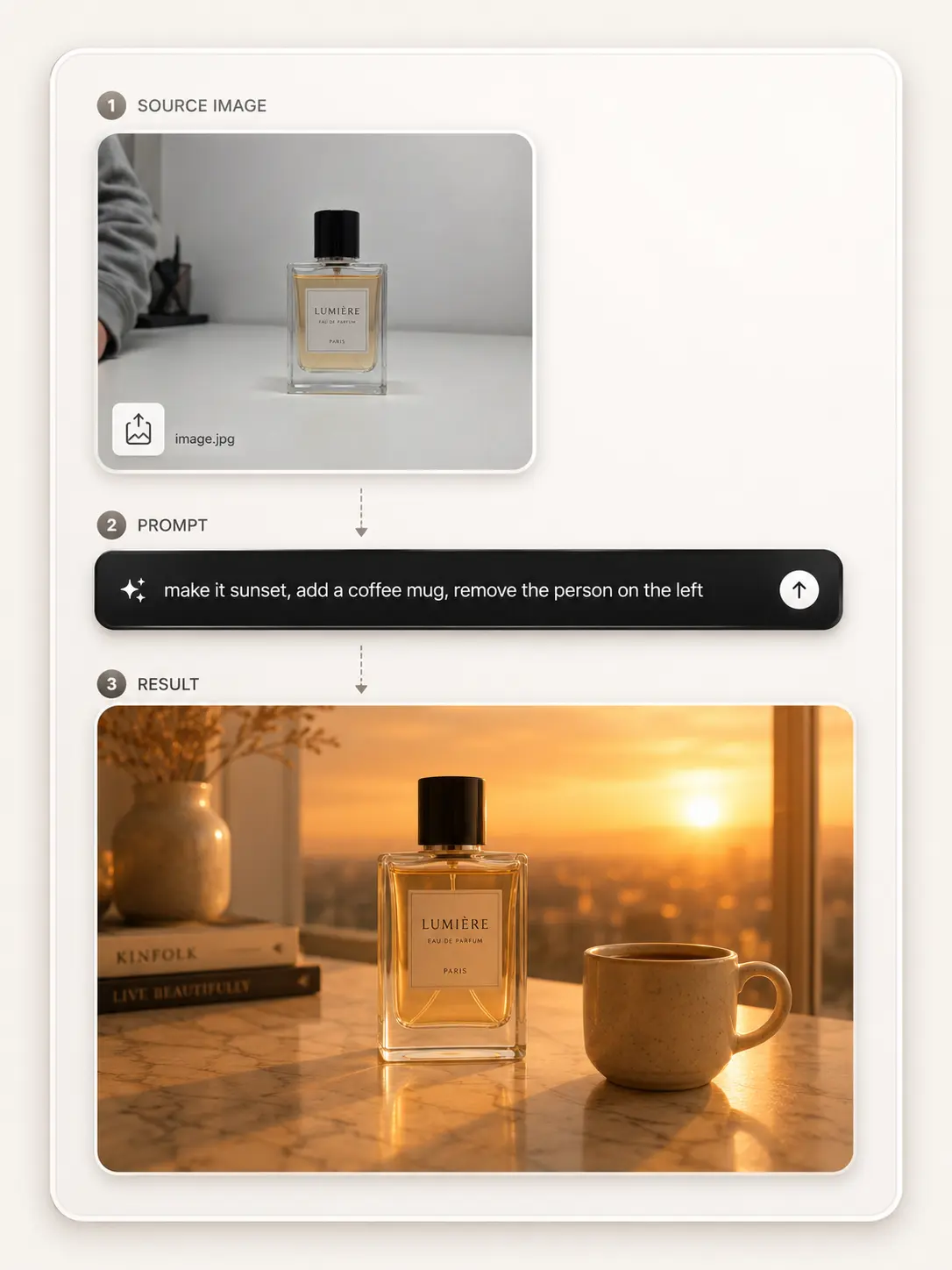
Edit anything in your photo by writing a sentence.
Changing one thing in a photo usually means masks, layers, and a second editing pass.
Here the prompt carries the edit: make the sky sunset, add a coffee mug, remove the person on the left. No mask. No layers.


Restyle, do not redraw
Restyle a photo without redrawing it.
Name the style in the prompt - anime, oil painting, watercolor, pencil sketch - and keep the same source composition as the starting point.


Where it gets reached for
When you'd reach for an image-to-image AI.

A product designer
Scoping the hero illustration for a product page.
Drops a rough sketch in, runs three style prompts, picks the one to take into Figma for final cleanup.

A photographer
Cleaning a cluttered portrait backdrop.
A portrait against a busy background gets a new scene from a prompt, with the original subject still anchoring the frame.

A social media manager
Three platform variants from one source.
Starts with one source, writes a platform-specific prompt, and keeps the visual direction consistent across channels.
Three steps, one screen
How to edit an image with a prompt.
Two inputs — an image and a sentence. No setup, no account step in between.
Step 1
Upload an image.
Start with a photo, product shot, sketch, or screenshot. JPG, PNG, and WebP all fit the same front-end flow.
Step 2
Write the prompt.
Name what you want changed: "add a hot air balloon", "make the background sunset", or "restyle as anime".
Step 3
Generate the edit.
Generate the edit, then preview and download the transformed image.

Frequently asked questions
Image to image AI - common questions.
Practical answers about masks, sketch input, output framing, resemblance, and how this tool chains with ImageHub.
Do I need to mask the area I want to edit?
No - the prompt does the targeting. Write "remove the person on the left" or "change the sky to sunset" and the model can use that instruction. For pixel-precise control on a specific region, the AI Object Remover is the more direct route.
Can I edit a sketch or illustration the same way as a photo?
Yes. Upload any visual - photo, sketch, screenshot, digital painting - and use the prompt as the edit instruction. Sketches usually want slightly more direction because the source has more interpretive room.
Can I control the output frame?
The current image-to-image API focuses on the uploaded image and edit prompt. If you need a different canvas afterward, use AI Image Extender after generation.
Will the result look exactly like the person or object in my upload?
Close, not identical. Image-to-image editing usually keeps the general pose and scene structure while changing what the prompt names. For a specific character swap, use AI Character Swap.
Can I use it without an account?
Yes — it's free to try with no login. Upload an image, write the prompt, and download the result.
Can I push the edited image to a higher resolution?
Yes. After editing, run the output through AI Image Upscaler if you need a larger version.
Ready to transform an image?
Drop in your photo or sketch, write the change in a prompt - that's the whole flow.
Upload an image ->