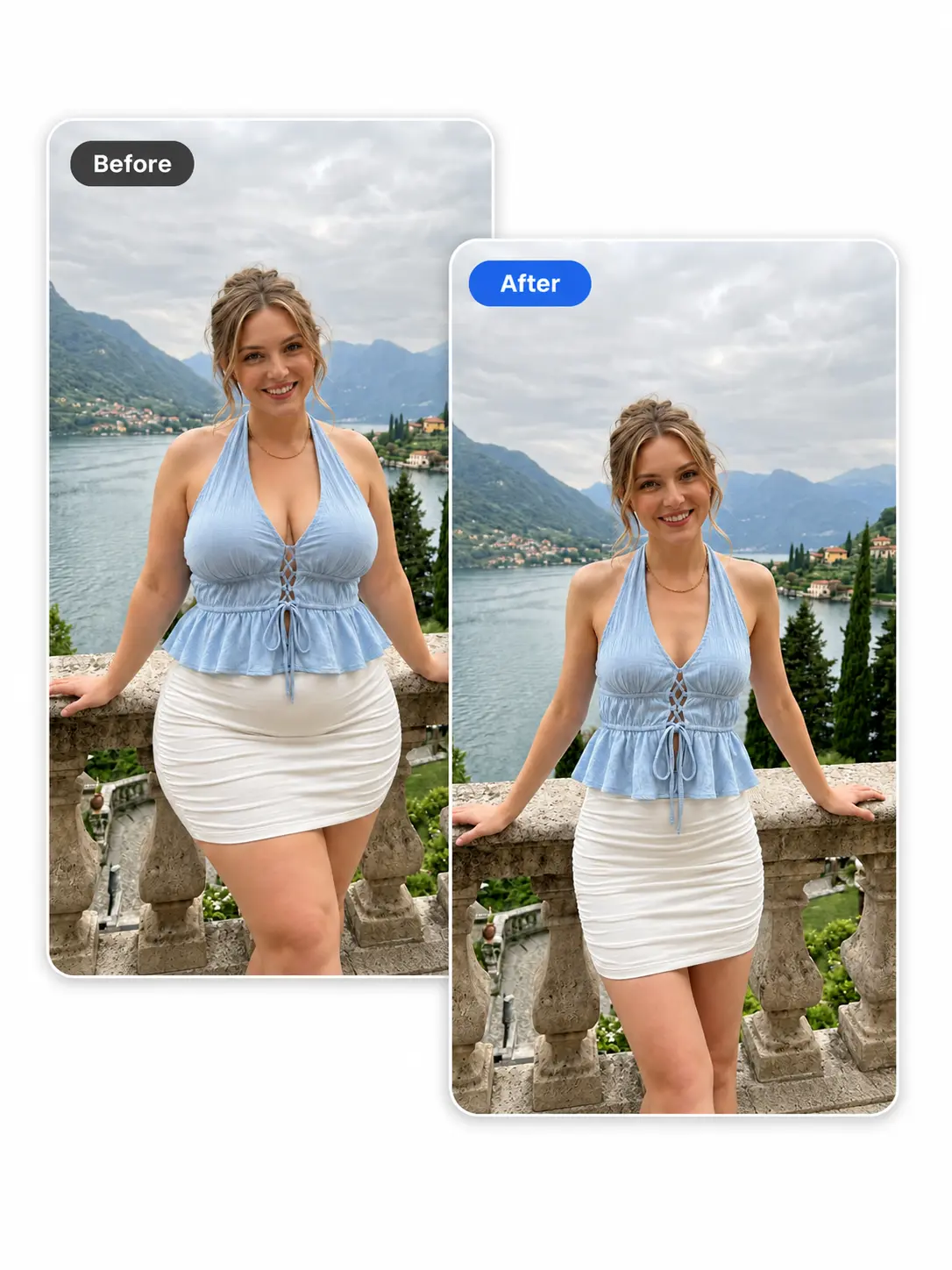
Free AI Body Editor to Reshape Your Body in Photos
Upload one photo, describe the body change in a few simple words, and let ImageHub create the edited result. Use the AI body editor to refine a waistline, lengthen the legs, adjust proportions, add definition, or explore a different silhouette without manual retouching.
Edit body shape with a prompt
1 · Upload your image
0/2000
✓Free to try
✓No login
✓HD output
✓Prompt-guided
3 · Your edited image
Your body-edit result will appear here
Processing your image…Please keep this page open while your image is being generated.
AI Body Editor Results for Waist, Legs, Arms, and Shape
See how different body adjustments change the balance of a photo. Each comparison focuses on one direction, making it easier to connect the original image, the requested change, and the returned result.
01
Slim the Waist and Refine the Silhouette
Use the AI body editor when you want the waistline or midsection to read differently in a portrait. A focused adjustment can change the relationship between the waist, hips, and upper body without turning the request into a full photo redesign. Compare the complete before-and-after frame, including the clothing and surrounding scene, before choosing the result you want to keep.
A body shape editor can explore how leg length affects the overall proportions of a standing or full-body photo. Ask for a taller-looking direction or a small balance change, then review how the legs relate to the torso, pose, crop, and ground line. Looking at the entire image helps you judge the edit as a composition rather than as an isolated body part.
Use the body photo editor to explore a more defined upper-body shape. The requested change might focus on the arms, shoulders, or visible muscle lines, depending on what the source photo shows. After processing, compare both sides of the body and inspect nearby sleeves, straps, hair, and background edges as part of the complete result.
An online body editor is not limited to making a figure look slimmer. You can also explore a softer, fuller, or more rounded silhouette when that direction better suits a portrait or creative concept. Review how the updated shape works with the pose and clothing, and compare the overall outline rather than judging only one area of the body.
Body reshaping appears in different types of portrait work. These examples show how the same upload-and-edit workflow fits social images, fitness concepts, and fashion photography without expanding into unrelated photo-editing jobs.
Use case 01
Refine Social, Profile, and Dating Photos
Portraits for Instagram, TikTok, dating profiles, and personal pages often put extra attention on posture and silhouette. ImageHub’s AI body editor gives you a way to explore a focused body adjustment before sharing the photo. Use the comparison to check whether the updated waistline, proportions, or posture still fits the angle, crop, outfit, and visual mood of the original shot.
A body editor online can help visualize a more athletic direction for a gym photo, character portrait, or creative fitness concept. Explore broader shoulders, more defined arms, or a different overall build, then evaluate the result as an edited image. It represents a visual idea based on the uploaded photo, not a prediction or guarantee of a real physical outcome.
Fashion portraits and lookbook images depend on the relationship between the model, garment, and full frame. Use the body reshaper to test how a small silhouette, posture, or proportion change reads with the outfit. Before using the edited image, check seams, hems, accessories, hands, and the space around the model to see how the complete composition was affected.
Upload the clearest photo you have, name the change in your own words, and compare the edited image with the original before you download it.
Step1
Step 1: Upload a photo
Choose an image where the body area you want to change is visible. A clear body outline makes the returned edit easier to compare with the original.
Step2
Step 2: Choose an idea or describe the change
Start with one of the suggestions in the editor or write a short request in your own words. Basic language is enough to name the area and the direction.
Step3
Step 3: Generate and download
Process the image, review the finished result, and download the HD image when it suits your goal. Return to the editor if you want to try another direction.
AI body edits are generated from the source image and requested change. Results may vary with pose, clothing, lighting, overlapping people, covered body areas, mirrors, or strong lines in the background.
✓Compare the edited body area with the original.
✓Inspect the face, hands, clothing edges, and nearby objects.
✓Review the result at the crop and size you plan to use.
✓Choose another source photo if the relevant area is hidden.
✓Only upload images you own or have permission to edit.
When an altered appearance could change how a photo is understood, disclose the use of AI where appropriate.
Other AI photo tools at ImageHub
Continue Editing With ImageHub
Choose the next focused tool based on what should change after the body edit.
Remove the background when the finished portrait needs a clean cutout or a new setting.
Frequently asked questions
AI Body Editor FAQs
What is an AI body editor?
An AI body editor changes body shape or proportions in an existing photo. With ImageHub, you upload one image, describe the adjustment, and receive one edited result to review and download.
Can I edit only one part of the body?
Yes. You can request a focused change to an area such as the waist, arms, shoulders, or legs. Review the full result because generated edits may affect nearby details.
Can a body shape editor make a figure fuller instead of slimmer?
Yes. Body editing can explore fuller and softer shapes as well as leaner or more defined directions. State the body area and the type of adjustment you want.
What photos work best for body editing?
Use a photo where the person and relevant body area are easy to see. A clear body outline is easier to evaluate than a crop or pose that hides the area.
Will my face, clothes, and background remain exactly the same?
Not always. AI editing can vary parts of the source image beyond the requested body area. Check the face, clothing, hands, and background before using the result.
Is ImageHub’s body editor online free to use?
Yes. ImageHub’s body editor is free and runs in your browser without a login.
Will the downloaded image have a watermark?
No. ImageHub adds no watermark to the result, and the tool provides HD output.
Reshape Your Photo for Free
Upload one photo, describe the body change, and download an HD result in your browser. No login is required, and ImageHub adds no watermark.