ImageHub
Try AI Beauty Filter
AI Generate
AI Enhance
AI Remove
AI Edit
AI Beauty

Free AI Beauty Filter for Photos

Upload a photo, choose the beauty look you want in a few simple words, and get a finished HD result. Go fresh and natural, polished and camera-ready, or somewhere in between. Everything starts in your browser.

Create Your AI Beauty Edit

1 · Upload your photo
0/220
  • Free to try
  • No login
  • HD output
  • Prompt-guided

3 · Your AI beauty result

AI beauty filter before-and-after portrait example

Original and result, side by side

AI Beauty Filter Before and After

Drag the slider to compare the original portrait with the finished ImageHub result. A before-and-after beauty filter view makes the change easier to judge than an isolated final image because the expression, framing, and source photo remain visible beside the edit.

ImageHub starts with one uploaded photo and returns one finished image. Keeping both sides together helps you decide whether the result suits the selfie, profile picture, or creative portrait you plan to use. Review the comparison, then download the HD image when the beauty edit matches the direction you wanted.

Try AI Beauty Filter Online →
Unretouched blonde selfie with natural skin texture
Blonde selfie after an AI beauty filter edit
Before
After

Drag the handle, or use the arrow keys. · HD download · No watermark

One photo, one finished edit

AI Beauty Filter Use Cases for Everyday Photos

You do not need to replace a good photo when the pose, expression, and framing already work. Use this beauty filter online to change the finish of an existing image, then compare the result with the original.

01

AI Beauty Filter for Selfies and Social Media Photos

An everyday selfie may already have the expression, angle, and setting you want. Use a beauty filter for photos you plan to share on Instagram, TikTok, a dating profile, or a creator feed. Start from a portrait you like, choose a lighter everyday finish or a more styled beauty direction, and review the result beside the source image. The selfie beauty filter keeps the job focused on one photo, so you can update its visual finish without staging a new shot. Download the clean HD output when it fits the post you are preparing.

Apply AI Beauty Filter to a Selfie →
Natural front-facing portrait before applying the AI beauty filter
Front-facing portrait after a subtle AI beauty filter edit
Before
After

Uploaded photo · ImageHub result · HD download

02

Refresh Profile Pictures With an AI Photo Retoucher

When an existing profile photo already represents you, generating a completely new headshot may be unnecessary. Use the AI photo retoucher as a portrait enhancer for LinkedIn, an About page, a speaker bio, a portfolio, or a creator profile. The uploaded portrait remains the starting point while you choose a cleaner, more polished, or more expressive beauty direction. Compare the final image with the original before replacing the photo on your profile. If you need a newly styled business portrait instead of editing an existing image, use the AI Headshot Generator.

Retouch a Profile Photo With AI →
Three-quarter profile portrait before AI photo retouching
Three-quarter profile portrait after AI photo retouching
Before
After

Uploaded photo · ImageHub result · HD download

03

Create Beauty and Fashion Portraits With an AI Beauty Editor

Beauty and fashion content often begins with a portrait that needs a clearer visual direction. Use the AI beauty editor for creator posts, fashion concepts, beauty moodboards, campaign drafts, and editorial-style social images. The text field lets you set the overall finish in ordinary language while the uploaded image provides the visual starting point. Review the before-and-after pair to see whether the result fits the layout, story, or visual theme you are building. The finished HD image can then move into your next creative step without an ImageHub watermark.

Create an AI Beauty Portrait →
Natural wet-hair portrait before AI beauty editing
Warm polished portrait after AI beauty editing
Before
After

Uploaded photo · ImageHub result · HD download

What the tool does differently

Why Use ImageHub for Online Beauty Editing?

Beauty Editing Without Fixed Filter Presets

ImageHub is not a catalog of named beauty filters that you have to browse one by one. You choose the visual direction in the text field using a few familiar words. The quick ideas in the hero simply fill that field to help you begin; they are starting descriptions, not separate filter products. This keeps the online beauty editor flexible without turning the page into a list of preset looks.

Describe Your AI Beauty Look →
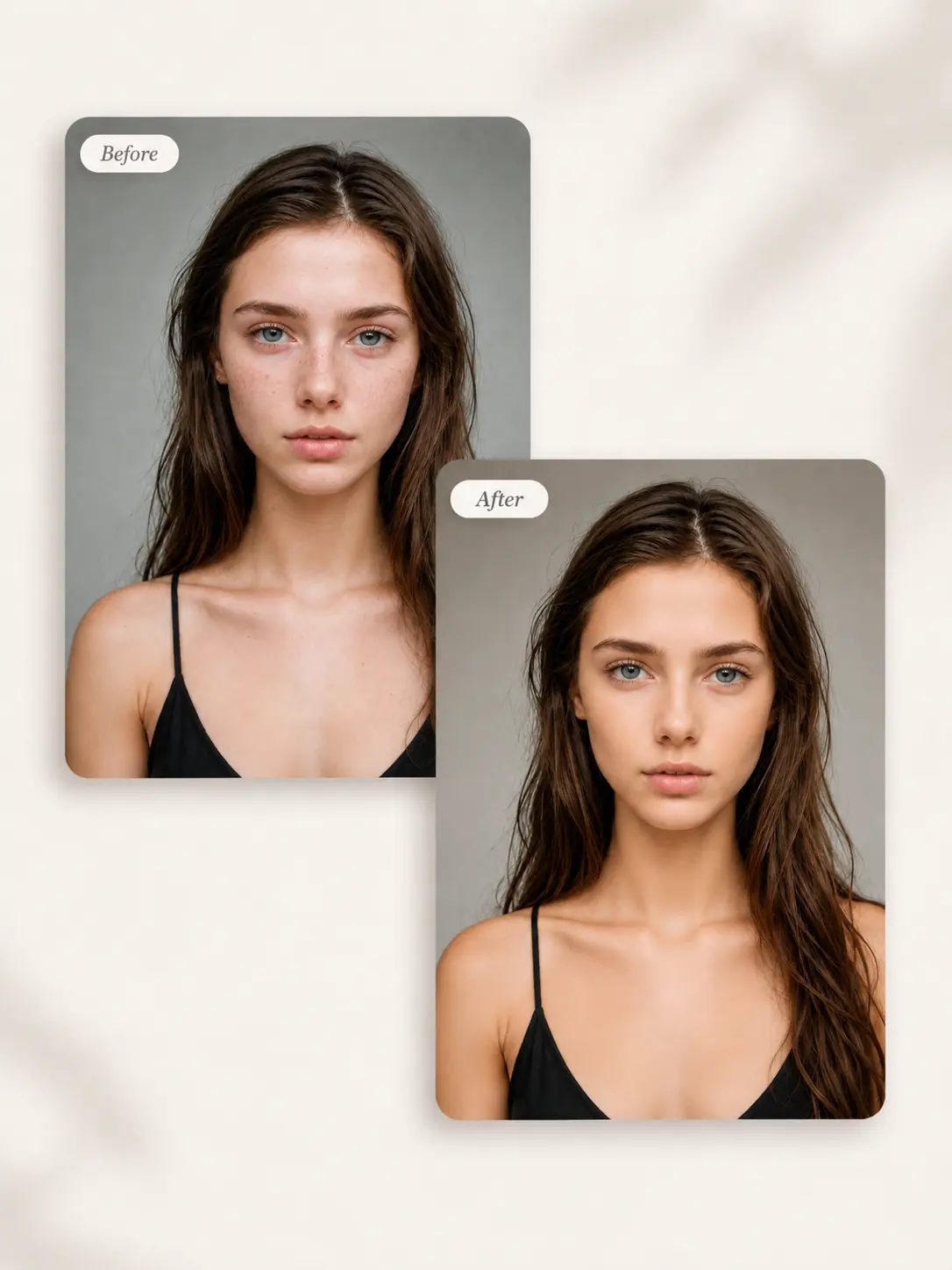
Before-and-after AI beauty retouch comparison for a selfie with acne marks

One Photo In, One Finished AI Face Retouch

Start with one uploaded image, choose the beauty direction, and receive one final result. The AI face retouch workflow stays focused on the photo in front of you, without asking you to build layers, draw masks, or make a series of manual brush selections. A dedicated before-and-after pair shows the source and finished edit together, so the workflow and result remain easy to understand.

Start an AI Face Retouch →
Before-and-after professional portrait retouch comparison

Compare the Online Beauty Edit Before You Download

ImageHub keeps the original portrait and finished result together, so you can evaluate the beauty edit before saving it. Check how the new finish works with the expression, framing, and intended use of the photo instead of judging the output on its own. Once the result fits your direction, download the clean HD image without an ImageHub watermark and move it into the profile, post, or creative draft you are preparing.

Compare AI Beauty Filter Results →
Side-by-side before-and-after AI beauty portrait comparison

Three steps in the browser

How to Apply a Beauty Filter in Three Steps

Upload the photo you want to keep, name the look in your own words, and compare the finished edit with the original before you download it.

AI beauty filter image upload step

Step 1: Upload Your Photo

Choose the image you want to edit and add it to the tool. This photo becomes the starting point for the final result.

AI beauty enhancement prompt example

Step 2: Choose Your Beauty Look

Type a few familiar words in the text box or tap one of the quick ideas beneath it. No technical retouching language is required.

Finished AI beauty portrait ready to download

Step 3: Apply and Download

Select Apply Beauty Filter, wait for processing to finish, and review the result beside the original. Download the finished image in HD with no ImageHub watermark.

Before you upload

Start With a Photo You Want to Keep

Choose a source image that clearly shows the person and the parts of the photo you care about. A clear starting image also makes the before-and-after comparison easier to evaluate. AI-generated edits vary with the source image and the selected direction, so review the final result before you use or share it.

For a change that is not specifically about beauty or portrait finish, try ImageHub’s AI Image-to-Image Generator. It handles broader image transformations, while this page stays focused on beauty-led portrait editing.

Frequently asked questions

AI Beauty Filter FAQs

What is an AI beauty filter?

An AI beauty filter applies a beauty-focused edit to an existing image and returns a finished version. ImageHub starts with the photo you upload and the visual direction you choose in the tool.

How do I apply a beauty filter to a photo online?

Upload the photo, choose the look in a few simple words or tap a quick idea, and select Apply Beauty Filter. When processing is complete, compare the images and download the HD result.

Can I choose a subtle or bolder beauty look?

Yes. Use the text field to name the direction and strength you want. The quick ideas in the tool provide an easy starting point.

What kinds of photos suit this AI beauty editor?

The tool is intended for beauty-focused edits to still images such as selfies, portraits, profile photos, and creative beauty imagery. Start with an image where the person and important details are easy to see.

Is the ImageHub AI beauty filter free, and do I need an account?

It is free to use, and you do not need to create an account or log in before you start.

Will the result have a watermark, and do I need to install an app?

No. ImageHub returns HD output without an ImageHub watermark. You use the beauty filter in your browser, so there is no app to install.

Create Your Beauty Edit

Upload a photo, choose the look, and get a clean HD result with ImageHub’s free AI beauty filter. No login, no watermark, and no app to install.

Try the Free AI Beauty Filter

Free · No login · No watermark · HD output

Quick check before we start

Confirm you are human, then continue. This keeps the tools free and available for everyone.